



























TECHNICAL SUPPORT


Published 2026-02-25
When playing with theservo, have you ever encountered this embarrassment: even though the program is written, theservokeeps shaking, or the movement is stuck like a PPT? In fact, this is probably because the timing is not correct. Especially when using a 6-channel USBservocontroller like Micro, understanding its "pulse" rhythm is more important than what servo you choose. Today we are going to talk about how to make this thing smooth and make your project move smoothly.
The speed of the steering gear rotation is, to put it bluntly, the rate of change of the pulse width of the control signal. Micro allows us to fine-tune the time it takes for each channel to go from the current angle to the target angle through scripts or instructions. For example, if you want the robotic arm to lift gracefully within 2 seconds instead of ejecting within 0.1 seconds, you must set the "speed" or "time" parameter in the command. Its interior will help you calculate how many transition pulses need to be sent in the middle to achieve smooth movement. In actual use, you can first test it by hand to find the appropriate exercise duration, and then write it into the code.
If the servo shakes, don't blame the quality of the servo. Many times, jitter occurs because the update frequency of the control signal does not match the internal circuit of the servo, or the power supply is insufficient. Although Micro has powerful voltage stabilization and signal processing capabilities, if your power supply ripple is too large, or if you drive multiple high-torque servos at the same time and the voltage is pulled down, the control chip inside the servos will "draw wind", which will appear as jittering back and forth. In addition, if the signal line is approached by strong interference sources such as motors, noise can easily be introduced. First check the power supply and use a multimeter to measure the dynamic voltage. Many times the problem is solved.
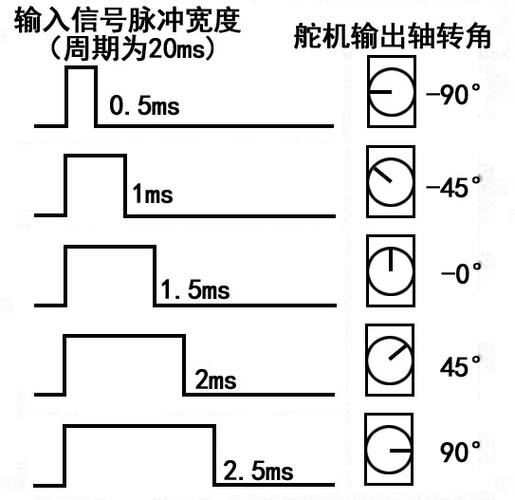
By default, Micro's servo pulse range is usually set to 1000µs to 2000µs, which corresponds to 0 to 180 degrees. However, in actual operation, many domestic servos may have a wider stroke range, such as 500µs to 2500µs, and can even rotate to more than 200 degrees.
If you find that the servo cannot rotate to the specified angle, or it gets stuck halfway through the rotation, then it is necessary to calibrate the minimum and maximum pulse width of each channel in the software. This operation is not complicated. You only need to select the channel, slide the slider manually, carefully observe the actual rotation limit of the servo, and then fill in the corresponding value. In this way, the steering gear can be effectively protected from being damaged and its full potential can be fully utilized.
When using USB to serial port for control, the most common error is baud rate mismatch. In the software, the default baud rate is 9600. However, if you write it in the code, communication will definitely not be possible. In addition, there is also the issue of the instruction format. The compact protocol used has extremely strict requirements for data verification. Even if it is just a byte transmission error, it will be ignored directly. It is recommended to first use the official test software to send simple commands. If the device can run normally, then carefully check the code you wrote yourself. In addition, don’t forget the delay that occurs when switching between transceivers and transceivers during half-duplex communication. Although this situation is handled very quickly, adding a few milliseconds of delay will make the communication more stable when instructions are sent continuously at high frequency.
At the same time, there are some other aspects that need to be paid attention to. When connecting a USB-to-serial device, make sure the interface is stable and not loose, otherwise the stability of data transmission may be affected. Moreover, different operating systems may have different compatibility, so during the debugging process, the operating system version must be fully considered. If you encounter unstable communication, in addition to checking the baud rate, command format, delay and other common issues, you can also try to change the USB interface or restart the computer to eliminate some potential interference factors and ensure stable and accurate control in various environments.
If you want to achieve coordinated actions of 6 servos at the same time, instead of acting one by one, the key is to use the "script" function. You can carefully write a script here, carefully set the target position and movement time of each channel, and then let the controller run the script independently, no longer relying on the computer to send commands in real time. In this way, even if the computer freezes, the robotic arm can still smoothly complete a set of combined actions.
If real-time control is carried out through the host computer, it is necessary to enable "multi-channel simultaneous command" to package and send the target angles of all channels at once to avoid desynchronization caused by network delays.
If the servo is stuck, chances are you are hungry. Each servo may consume several amps of current when locked. If 6 of them work together, the instantaneous current can easily exceed 20A. If you only use USB power supply, not only will it not be able to carry it, but it may also burn out the computer motherboard. The correct approach is to provide a separate power supply, connect the servo power cord directly to a battery or switching power supply with sufficient power, and only allow the signal to be received through USB. Note that the ground wire of the power supply and the ground wire of the computer must be connected to the same ground, otherwise the signal will float randomly. With the power supply in place, most of the stuttering and jittering can be solved.
Seeing this, do you realize that steering gear control is not that mysterious? In fact, many problems lie in the details. What is the most difficult steering gear problem you have ever encountered while working on a project? Welcome to share your "history of blood and tears" in the comment area, and let's avoid pitfalls together. If you find this article useful, don’t forget to like and forward it so that more friends who play servos can see it!
Update Time:2026-02-25

Contact Kpower's product specialist to recommend suitable motor or gearbox for your product.








