



























TECHNICAL SUPPORT


Published 2026-03-16
When you are debugging theservo, do you often encounter jitter, slow response, or failure to turn in place no matter how you turn it? After struggling for a long time, I finally found that the root cause of the problem often lies in the "servodriver" that sounds a bit abstract. What exactly is this thing, and why is it so important?
Simply put, the servo driver is the bridge that connects your brain (main control chip, such as STM32) and the servo body, or in other words, it is a conscientious "translator". Your main control chip only understands the digital signals of 0 and 1, but the servo needs an electrical pulse of a specific width to turn to a specified angle.
The task of this driver is to accurately translate the instruction of how many degrees you want it to turn into a PWM (Pulse Width Modulation) signal that the servo can understand. It is responsible for outputting the correct pulse width at the correct time. Without this program, the instructions you give to the servo are like playing the piano to a cow. It doesn't know what to do at all, and it will either stay still or turn around randomly.
The impact is huge. It can be said that the quality of the driver directly determines whether the servo's performance in your project is a "thousand-mile horse" or a "stubborn donkey". A well-written driver can make the servo respond quickly, rotate smoothly, and hit wherever you point it, and it is very power-saving.
On the contrary, a shoddy driver may cause the servo to vibrate significantly and still be "shivering" after reaching the target position; or it may respond slowly, and it will take a long time before it starts to move after you send the command; in severe cases, it may cause the servo to heat up severely and even burn out the internal motor. When working on projects that require the coordinated work of multiple servos, such as a robot dog or a six-axis robotic arm, small flaws in the driver will be magnified, causing the entire system to malfunction.
When choosing a driver, it’s not that more expensive is better, nor that more code is better. The key depends on your “wallet” and specific needs. You need to first figure out whether the servo you have is an analog servo or a digital servo. They have slightly different requirements for drive signals. Generally speaking, digital servos have a wider response to drive frequencies.
You need to look at the control interface. The most commonly used one is to use PWM wave for control. This kind of driving logic is the simplest and you can write it yourself. But if you have a particularly large number of servos, such as more than a dozen, then you should consider serial bus servos. The drivers and communication protocols they use are matching. At this time, it is very important to choose a mature driver library, which can help you save a lot of debugging time. You can go to the official websites of some Kpower or servo manufacturers to see if they provide ready-made driver libraries or application notes.
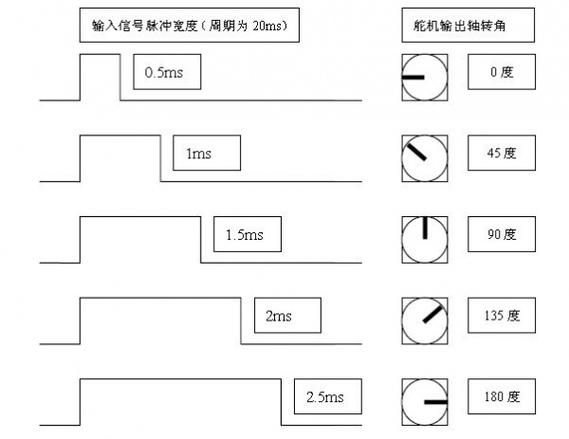
If you want to write one by yourself, it is actually not that mysterious. It is usually just a few pieces of code with clear logic. Taking the most commonly used PWM servo as an example, the core is that you need to understand the control principle of the servo: Generally speaking, the period is a pulse signal of 20ms, and the high-level time is between 0.5ms and 2.5ms, corresponding to 0 degrees to 180 degrees of the servo.
When writing a program, you first need to initialize a timer and let it generate a PWM wave with a period of 20ms. Then, you need to write an angle mapping function, such as converting the angle value from 0 to 180 into a pulse width value of 0.5 to 2.5 milliseconds, and then setting it to the PWM register. Like theservo.write()function in the platform, this is what is done behind the scenes. By writing it down, you will have a much deeper understanding of how the steering gear works, and it will be easier to troubleshoot problems you encounter in the future.
The biggest fear when playing with steering gear is encountering inexplicable problems. For example, if the servo vibrates, this is usually not a program logic error, but a physical problem. The most common reason is insufficient power supply! The current when the servo is started is very large. If the power supply cannot keep up, it will cause the main control board to reset or the servo to twitch. The solution is to connect a large capacitor in parallel with the power supply.
Another example is that the servo cannot turn to the specified angle, or it cannot be maintained after turning. This may be because the calculation range of your PWM pulse width is not set correctly, or the servo has insufficient torque and is stuck. It is also possible that the commands to control the servo in your program are issued too frequently, exceeding the response speed of the servo itself, causing it to fail to respond. At this time, the problem can usually be solved by slightly reducing the frequency of sending control instructions, or adding a little delay between the two instructions.
If you pursue higher control accuracy, such as using a servo to make a high-precision gimbal, then the basic driver is not enough. You can consider introducing some optimization algorithms. For example, using "S-curve acceleration and deceleration" to control the start and stop of the servo, instead of letting it start and stop instantly, can greatly reduce the jitter at the start and stop moment.
Going a step further, you can add a PID (Proportional Integral Derivative) closed-loop control algorithm to the driver. This requires your servo to support angle feedback (usually the command servo). The driver will read the current angle in real time, compare it with the target angle, and then use the PID algorithm to calculate the control amount that should be output at the next moment, so that the servo can quickly and steadily converge to the target angle. Although this optimization makes the code a little more complicated, the performance improvement is immediate.
What is the most troublesome and maddening problem you encounter when debugging the servo on a project? Is it insufficient power supply or a bug in the program logic? Welcome to leave a message in the comment area to share your experience, and we can discuss and solve it together! If you find the article useful, don’t forget to give it a like and share it with your friends who are also playing with servos.
Update Time:2026-03-16

Contact Kpower's product specialist to recommend suitable motor or gearbox for your product.








